
How to Get WordPress Emails to Work
 Reading Time: 4 minutes
So, you can’t get your WordPress website email to work. Forms get filled out, and nothing arrives in your inbox. Update and user activity emails are MIA. That’s probably because we skipped a few simple steps. So, let’s get your WordPress email up and running!
Your Email Address Makes a Difference
The first thing to set up is a domain email address for the website. An email address that uses the same domain as your website.
For example, you can use we*****@********in.com, re******@********in.com, or he***@********in.com. You get the idea. Just don’t use info@—spammers target that address.
If you use an off-site email address, such as yo*@***il.com, aol.com, or yahoo.com, you likely won’t receive WordPress system-generated emails. Why? Security.
Obvious security concerns arise when you use an email address that doesn’t match your website’s domain. For example, someone can’t hack your site and then use it to send emails from an address other than your .com address. That makes sense, right?
Some web hosts offer domain email services, while others only provide hosting servers—not email servers. In my case, I use Zoho.com for my email and hosting email for my other sites. I like keeping hosting and email separate so that if one goes down, the other still works.
You want to consider whether having your email and website on the same server is a good idea. If the server goes down, you will be entirely offline and have no way to communicate your status with a branded website email address that folks would recognize.
Email Authentication Methods
Your email provider will furnish Mail Exchange Servers (MX Servers) that must be added to your domain’s DNS record. Also, look for comprehensive security with DKIM, DMARC, and SPF TXT records, which you can add.
These additional DNS records prove to ISPs and email services that senders are authorized to send email from a particular domain. In addition, these DNS records verify that your outgoing email server sends email through your domain.
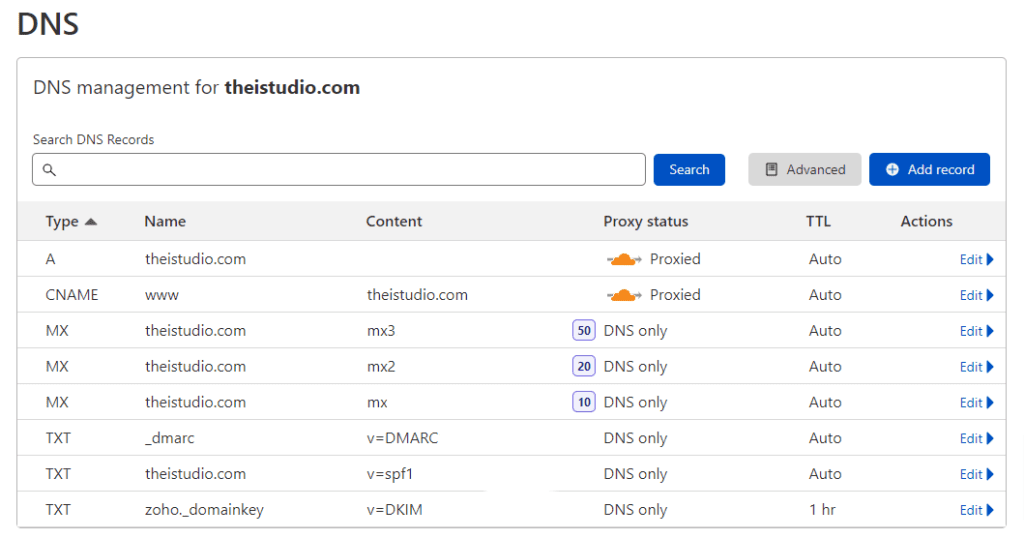
So be sure to get the DMARC, SPF and DKIM records in place on your domain’s DNS recored. Doing so adds security and trust to your domain email activities
An SMTP Plugin is a Good Idea
You should use an SMTP (Simple Mail Transfer Protocol) plugin because WordPress by default relies on an unreliable method to send emails that often causes your messages to get blocked or sent straight to the spam folder.
By default, WordPress uses a backend server function called PHP mail to send automated notifications. An SMTP plugin bypasses this broken system and routes your emails through a professional, dedicated email provider
Here are a few plugins I have used and, therefore, can recommend:
WordPress SMTP Settings
You’ll need a few bits of information on hand before you can set up your email service or hosting company to route your website emails.
Once the correct settings are in place, send a test email via the plugin. Then go to your website and complete test contact forms you have in place to double-check that they work as you expect.
If all goes smoothly, you’ll have your WordPress website emails configured and one less thing to worry about.
At your service,

*Some of the links on this page are to companies with which I have a professional affiliation.
Read my complete affiliate statement here.
